
Server performance is not determined by processor speed or installed RAM alone. The way a server connects its processors to memory also plays an important role in determining how efficiently applications execute. On systems with multiple processors, the distance between a CPU and the memory it needs can influence access latency, bandwidth and overall workload performance.
This is where NUMA architecture becomes important. Modern multi-socket servers use this memory design to distribute processing and memory resources across different parts of the system. Instead of making every processor access all memory through a single shared path, NUMA allows processors to access nearby memory more efficiently while still providing memory access connected to other processors.
However, having multiple memory nodes does not automatically guarantee better performance. Applications, operating systems and virtualization platforms must manage CPU placement and memory allocation carefully to take advantage of the hardware.
Understanding how Non-Uniform Memory Access works helps server administrators identify memory-related bottlenecks, optimize resource allocation and maintain consistent application performance. This article explores how NUMA nodes operate, why memory locality matters and how administrators can optimize NUMA memory architecture on Linux servers.
What Is NUMA Architecture?
NUMA stands for Non-Uniform Memory Access. It is a computer memory design in which the time required by a processor to access memory depends on where that memory is physically located within the system.
In a traditional Uniform Memory Access (UMA) design, processors access shared memory with approximately equal access characteristics. However, as server systems evolved to include multiple processor sockets and larger memory capacities, maintaining equal memory access across every processor became increasingly difficult.
NUMA architecture addresses this challenge by dividing system resources into separate groups called NUMA nodes. Each node contains one or more processors or CPU cores and has access to its associated local memory.
A processor can access memory attached to its own node directly through its local memory controller. It can also access memory belonging to another node, but that request generally travels through an interconnect connecting the processors. This relationship between processor resources and memory access is also important when evaluating CPU core count and processing efficiency, as both CPU capabilities and memory locality influence overall server performance.
For example, consider a server with two physical processor sockets. Each processor has its own memory controller and dedicated RAM resources. The first processor can access its locally connected RAM with lower latency, while accessing the second processor’s memory requires communication across the processor interconnect.
This arrangement allows the system to distribute memory bandwidth across multiple processors instead of relying entirely on one centralized memory subsystem.
The main characteristics of NUMA architecture include:
- Distributed memory: Physical memory is organized across multiple nodes rather than being treated as one equally accessible pool.
- Local memory access: Each processor has memory access connected to its own node.
- Remote memory access: Processors can access memory attached to other nodes through system interconnects.
- Scalable memory bandwidth: Multiple memory controllers can serve memory requests across different nodes.
- Hardware-aware resource management: Operating systems can use processor and memory topology information when allocating resources.
The important distinction is that memory remains accessible across the system, but access costs are not identical. This difference is what makes memory locality an important consideration in server performance.
How Does NUMA Architecture Work?
To understand how this memory design affects performance, it is useful to look at how processors, memory controllers and interconnects communicate.
In a NUMA-based server, processors are connected to their respective memory resources. These processor and memory groups form individual nodes, which communicate with one another through high-speed interconnects.
The operating system identifies the hardware topology and uses it to manage memory allocation and processor scheduling.
CPU and Memory Distribution Across NUMA Nodes
A NUMA node generally represents a group of CPU resources and the memory closest to those resources.
In a two-socket server, each processor socket may correspond to a separate node. However, this relationship is not universal. Depending on the processor model, motherboard configuration and firmware settings, a single socket can expose multiple NUMA nodes.
For example, a server might have the following configuration:
- NUMA Node 0: CPU cores 0–15 with 64 GB of local RAM.
- NUMA Node 1: CPU cores 16–31 with 64 GB of local RAM.
Both nodes are part of the same physical server, and applications can access memory from either node.
The operating system uses this topology to determine which processors and memory resources are closest to one another. This information helps it make more efficient allocation and scheduling decisions.
Local Memory Access
Local memory access happens when a processor accesses RAM attached to its own NUMA node.
This is generally the preferred arrangement because the memory request does not need to travel across another processor’s interconnect to reach the target memory controller.
For instance, when a process runs on a CPU core belonging to Node 0 and accesses memory allocated from Node 0, the request can be handled through the local memory subsystem.
This can provide lower memory access latency and avoid unnecessary inter-node communication.
For applications that frequently access large amounts of memory, maintaining local access can make a meaningful difference to performance.
Remote Memory Access
Remote memory access occurs when a processor requests data stored in memory attached to another NUMA node.
Suppose a process is running on Node 0, but its required memory pages are allocated on Node 1. The memory request must travel through the processor interconnect before reaching the remote memory controller.
The additional communication introduces latency and consumes interconnect bandwidth. This makes efficient memory allocation important, particularly when a server is handling memory-intensive workloads. Understanding what happens when a server runs out of RAM also helps administrators recognize how memory pressure can affect application stability and overall server performance.
Remote access is not necessarily a problem in every situation. Modern servers are designed to support it, and applications may perform perfectly well even when some memory requests cross nodes.
However, workloads that generate frequent remote memory requests can experience reduced performance compared with workloads that maintain better memory locality.
Interconnects and Communication Between NUMA Nodes
The processor interconnect provides communication between different nodes. It allows CPUs to access remote memory and maintain communication across the system.
Depending on the processor platform, different interconnect technologies are used. For example, Intel multi-socket platforms use technologies such as Ultra Path Interconnect (UPI), while AMD EPYC platforms use Infinity Fabric for communication within their processor architecture.
These technologies help maintain connectivity between processor resources, memory controllers and other system components.
However, remote communication still has a cost. If applications generate excessive cross-node traffic, the interconnect can become an additional source of performance pressure.
What Are NUMA Nodes and How Do They Manage Memory?
NUMA nodes are the individual resource groups that make up a NUMA-based system. Each node has its own relationship with processor cores, memory capacity and other hardware resources.
The number of nodes depends on the server’s processor architecture and configuration. A server with multiple processor sockets may expose multiple nodes, while some processors can divide a single socket into several NUMA domains.
Understanding NUMA nodes is important because the operating system uses them to organize memory and CPU resources.
CPU Cores and Memory Allocation Within a Node
Each node contains CPU resources that have a relatively close relationship with a particular portion of system memory.
When an application requests memory, the operating system generally attempts to allocate it from the node associated with the CPU executing the request.
This is called local memory allocation.
For example, if an application is running on Node 0, the Linux kernel will normally try to allocate memory from Node 0 first. If sufficient memory is unavailable, the system may use another suitable node according to its allocation policies.
This behavior helps maintain locality without requiring administrators to manually assign every memory request.
How the Operating System Identifies NUMA Nodes
The operating system detects the available hardware topology and represents it through software structures.
On Linux, administrators can inspect this information through system utilities and the /sys filesystem.
The directory /sys/devices/system/node/ contains information about available nodes, their CPUs, memory and relative distances.
The kernel also uses node information when managing memory allocation, scheduling and resource availability.
Linux attempts to keep memory allocation close to the CPU that requests it. However, workload movement, resource pressure and application behavior can change where memory is accessed over time.
This means that understanding the hardware topology is only the first step. Administrators must also examine how applications actually use the available resources.
NUMA Architecture vs. UMA Architecture: What Is the Difference?
Both NUMA and UMA describe how processors access system memory, but they organize memory resources differently.
In UMA systems, all processors access a shared memory space with approximately equal access characteristics. This arrangement is relatively straightforward but can introduce scalability limitations as the number of processors and memory requests increases.
NUMA distributes memory across multiple nodes, allowing each processor group to access its local memory more efficiently.
The main differences are:
| Comparison factor | UMA | NUMA |
| Memory organization | Shared memory | Distributed memory nodes |
| Access latency | Approximately uniform | Depends on memory location |
| Local memory | Not separated by NUMA nodes | Available within each node |
| Remote memory | Not applicable in the same NUMA sense | Accessible through interconnects |
| Scalability | Can face shared-memory bottlenecks | Supports distributed memory bandwidth |
| Resource management | Relatively simple | Requires topology-aware management |
One important point is that NUMA does not eliminate memory bottlenecks. It changes how memory resources are distributed and accessed.
Its performance benefits depend on the processor design, workload characteristics and how effectively software uses the available memory resources.
How Does Memory Locality Affect Server Performance?
Memory locality describes how close the memory being accessed is to the processor operating.
In NUMA-based systems, local memory is generally faster to access than remote memory. This difference can influence application response time, memory bandwidth utilization and overall processing efficiency.
The impact becomes particularly relevant when applications repeatedly access large datasets or perform memory-intensive operations.
Memory Access Latency and CPU Efficiency
When a processor needs data not in its cache, it may have to retrieve it from system memory.
If the required data is stored locally, the local memory subsystem can handle the request. If it is stored on another node, the processor must communicate through the interconnect.
This additional communication can increase memory access latency.
When applications perform a large number of memory operations, even relatively small differences in access time can affect overall execution.
However, the impact depends on factors such as cache hit rates, memory access patterns, processor architecture and the amount of remote memory traffic.
Memory Bandwidth and Cross-Node Traffic
Memory bandwidth determines how much data can be transferred between the processor and memory within a given period.
One advantage of distributed memory systems is that multiple memory controllers can serve requests independently.
However, applications that frequently access remote memory place additional demands on the processor interconnect.
If cross-node communication becomes excessive, it can compete for available interconnect bandwidth and reduce the efficiency of memory operations.
For memory-intensive workloads, keeping frequently accessed data close to the processor can help reduce unnecessary traffic and improve resource utilization.
Application Response Time and Processing Throughput
Poor memory locality can affect applications that depend heavily on frequent memory access.
Consider a database server processing thousands of queries. If its active working data is frequently accessed from remote memory, additional memory latency may affect query execution time.
The same principle applies to virtualization platforms running multiple memory-intensive virtual machines.
In these situations, NUMA-aware resource placement can help applications make better use of available processor and memory resources.
It is important to remember that memory locality is one performance factor among many. Storage latency, CPU utilization, network performance, caching and application design also influence the final result.
CPU Scheduling and Memory Placement
CPU scheduling determines where application threads execute.
These two decisions are closely connected. The relationship between processor capacity and workload distribution also makes CPU core count and clock speed for server performance important considerations when evaluating how efficiently a server handles demanding applications.
These two decisions are closely connected.
For example, an application may initially execute on Node 0 and allocate most of its memory locally. If its threads later move to Node 1, they may begin accessing memory that is now remote.
This can reduce memory locality even though the server still has sufficient RAM and available CPU capacity.
A NUMA-aware scheduling and memory management strategy helps reduce unnecessary movement between distant nodes.
What Happens When NUMA Memory Is Not Optimized?
Incorrect resource placement does not necessarily cause a server to fail. In many cases, the system continues operating normally but may not deliver the performance expected from its hardware.
Some common problems include:
Increased Remote Memory Access
When applications frequently access memory from distant nodes, memory requests must travel through the interconnect.
This can increase access latency and create additional communication overhead.
The effect is more noticeable in workloads that perform frequent memory operations rather than applications that spend most of their time waiting for storage or network responses.
CPU and Memory Resource Imbalance
A server may have sufficient total memory but still experience pressure on an individual node.
For example, Node 0 may have limited available memory while Node 1 has unused capacity.
Depending on the allocation policy and workload, memory requests may need to fall back to other nodes or experience allocation pressure.
Looking only at total RAM utilization can hide these differences.
Reduced Performance in Multi-Threaded Applications
Multi-threaded applications can execute several operations simultaneously across different CPU cores.
However, if threads access memory located on other nodes, the application may generate unnecessary remote memory traffic.
This is particularly relevant for databases, analytics platforms and other applications that share large memory structures between threads.
Virtual Machine Performance Issues
Virtualization introduces another layer of resource placement.
A virtual machine may receive virtual CPUs and memory, but the underlying hypervisor still has to map those resources to physical CPUs and memory nodes.
If a virtual machine’s memory is distributed poorly across physical nodes, its workloads may experience unnecessary remote access.
This is why virtual NUMA configuration and physical resource placement should be considered when managing larger virtual machines.
How to Optimize NUMA Architecture for Better Server Performance
Optimizing memory locality requires more than changing a single server setting. Administrators need to understand the hardware topology, workload behavior and memory allocation patterns before applying configuration changes.
The objective is to reduce unnecessary remote memory access while maintaining balanced resource utilization.
Configure CPU and Memory Affinity
CPU affinity controls which CPU cores a process or thread can use.
Memory affinity influences which NUMA nodes are preferred or permitted for memory allocation.
By coordinating these settings, administrators can keep application threads closer to the memory they frequently access.
Linux provides tools such as taskset and numactl to manage CPU and memory placement.
However, restricting a workload to a particular node without understanding its memory requirements can create resource pressure. Affinity should be configured according to actual workload behavior.
Use NUMA-Aware Memory Allocation
Applications that understand the system’s NUMA topology can make more informed memory allocation decisions.
For example, a database application can allocate memory near the CPU resources responsible for processing its workload.
Linux also supports different memory allocation policies:
- Default or local allocation: Attempts to allocate memory near the CPU requesting it.
- Preferred allocation: Prioritizes a selected node but can use other nodes if necessary.
- Bind allocation: Restricts allocation to a specified set of nodes.
- Interleave allocation: Distributes memory pages across selected nodes.
Interleaving can be useful for workloads that benefit from spreading memory traffic across multiple nodes. However, it is not automatically the best choice for every application.
The correct policy depends on memory access patterns and workload requirements.
Balance Workloads Across NUMA Nodes
A well-configured server should avoid unnecessary resource concentration on a single node.
If one node is heavily loaded while another has available CPU and memory capacity, workload distribution may need to be reviewed.
Administrators should monitor node-level CPU utilization, memory consumption and allocation patterns rather than relying only on overall server statistics.
This helps identify whether a workload is using resources efficiently or creating avoidable pressure on one part of the system.
Optimize Virtual Machine NUMA Configuration
Large virtual machines can benefit from virtual NUMA topology when the hypervisor exposes a suitable configuration to the guest operating system.
Virtual CPU placement and memory allocation should be considered together.
For example, assigning a virtual machine more CPU resources than can be efficiently accommodated within its intended physical NUMA layout may introduce additional cross-node communication.
Administrators should evaluate the virtual machine’s resource requirements, host topology and hypervisor configuration before changing virtual NUMA settings.
Monitor Remote Memory Access and Node Utilization
Performance optimization should be based on measurements rather than assumptions.
Administrators can monitor memory allocation across nodes, CPU placement and NUMA statistics to identify potential issues.
Useful tools include:
- numastat for NUMA memory statistics.
- numactl for examining and managing NUMA policies.
- lscpu for processor and node topology.
- Linux performance monitoring tools for investigating CPU and memory behavior.
Monitoring these metrics over time can help identify whether remote memory access is actually affecting application performance.
How to Check NUMA Configuration on a Linux Server
Linux provides several built-in utilities that help administrators understand how processor and memory resources are distributed.
Before applying any optimization, it is useful to inspect the existing configuration.
Check NUMA Nodes Using lscpu
Run the following command:

This command displays processor information, including CPU architecture, socket count, core count and NUMA node details.
Look for the NUMA-related output:

This example indicates that the system exposes two NUMA nodes, with CPU resources assigned to each node.
The actual output will depend on the server’s processor configuration.
View NUMA Memory Distribution Using numactl
The following command displays the available NUMA nodes and their memory information:

It provides details such as the number of nodes, available CPUs, memory capacity and relative node distances.
For example:
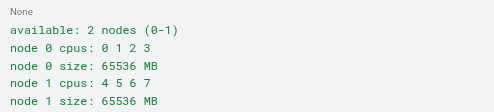
This helps administrators understand how memory is distributed across the system.
Monitor NUMA Statistics Using numastat
To examine memory allocation statistics, run:

The command provides information about memory allocation across NUMA nodes.
It can help identify differences in allocation patterns and provide an initial indication of whether memory is being distributed as expected.
For application-specific analysis, administrators can also run:

Replace <PID> with the process ID of the application being investigated.
This helps examine the NUMA memory distribution of an individual process.
Inspect NUMA Node Information in Linux
Linux exposes node-specific information through the sysfs filesystem.
Run:

You may see entries such as:

To inspect the CPU list associated with a particular node, use:

You can also inspect memory information through:

These files provide useful information about the system’s NUMA topology and node-level memory resources.
Together, these commands give administrators a practical starting point for investigating memory locality on Linux servers.
Which Server Workloads Benefit Most From NUMA Optimization?
Not every application experiences the same benefits from NUMA tuning. Workloads that frequently access large amounts of memory are generally more sensitive to memory placement than applications with relatively low memory demands.
Some common examples include:
Database Servers
Database systems frequently access large working datasets, indexes and in-memory caches.
When database processes repeatedly access remote memory, additional latency can affect query execution and processing efficiency.
NUMA-aware memory allocation and CPU placement can help improve memory locality, particularly on larger multi-socket database servers.
Virtualization and Cloud Hosting
Virtualization platforms run multiple virtual machines on shared physical hardware.
Each virtual machine consumes CPU and memory resources that must be mapped to the host’s physical topology.
NUMA-aware virtual machine placement helps administrators manage these resources more efficiently and avoid unnecessary cross-node memory access.
High-Performance Computing (HPC)
High-performance computing workloads often perform large numbers of calculations using substantial amounts of memory.
Scientific simulations, engineering applications and data-intensive processing can be sensitive to memory bandwidth and access latency.
In these environments, understanding NUMA topology is an important part of performance optimization.
AI and Data Processing Workloads
AI infrastructure often combines GPUs, CPUs and large memory resources.
Although GPU performance depends on several hardware and software factors, CPU-side data preparation, memory allocation and communication between devices can also influence overall workload efficiency. Choosing the right hardware configuration is therefore important, especially when evaluating AI server requirements for inference workloads, where CPU, RAM and GPU resources need to work together efficiently.
NUMA-aware CPU and memory placement can help reduce unnecessary data movement in certain AI and data processing environments.
For compute-intensive AI applications, choosing suitable GPU server infrastructure is equally important. Platforms like GPU4Host provide GPU-powered hosting solutions for demanding AI and high-performance computing workloads.
High-Traffic Enterprise Applications
Enterprise applications handling large numbers of concurrent requests may rely on in-memory caching, databases and multi-threaded processing.
If these applications are deployed on multi-socket servers, efficient memory placement can help maintain predictable resource utilization under demanding workloads.
Common NUMA Optimization Mistakes to Avoid
Even when administrators understand NUMA concepts, incorrect configuration decisions can create new performance problems.
Some common mistakes include:
Ignoring hardware topology: Assuming that all CPU cores have equal access to every memory bank can lead to inefficient resource placement.
Overusing CPU affinity: Restricting processes to specific CPU cores without considering memory allocation can create unnecessary resource constraints.
Ignoring node-level memory usage: Monitoring total RAM consumption without checking individual nodes may hide local memory pressure.
Applying memory interleaving everywhere: Interleaving can benefit certain workloads, but it may reduce locality for applications that primarily access memory associated with one node.
Overlooking virtualization settings: Large virtual machines need appropriate virtual CPU and memory placement to work efficiently with the physical server topology.
Changing settings without benchmarking: A configuration that improves one workload may negatively affect another. Always compare performance before and after applying NUMA-related changes.
Conclusion: Why NUMA Architecture Matters for Modern Server Performance
Modern servers need efficient communication between processors and memory to handle demanding workloads. As systems become larger and more complex, memory placement becomes an important part of overall hardware performance.
NUMA architecture addresses the limitations of centralized memory access by distributing memory resources across multiple nodes. This allows processors to access nearby memory more efficiently while retaining access to resources located elsewhere in the system.
However, the benefits depend on how effectively the operating system, applications and virtualization platforms manage CPU placement and memory allocation.
For server administrators, understanding NUMA nodes, local and remote memory access, and workload distribution provides a practical foundation for identifying performance bottlenecks.
By monitoring node-level resource usage, applying suitable memory policies and maintaining better memory locality, administrators can make more effective use of available server hardware.
Ultimately, efficient memory management is not just about having more RAM. It is also about ensuring that processors can access the memory they need without unnecessary communication overhead. Businesses running demanding workloads should also consider reliable Linux VPS hosting infrastructure that provides the resources and flexibility needed to support their server requirements.