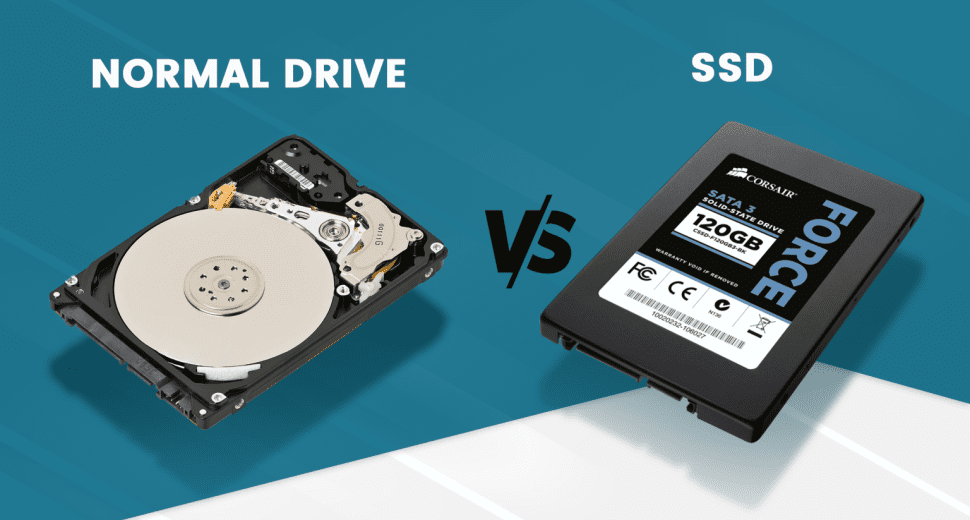
SSD vs HDD: Understanding the Differences in Data Storage
When selecting a specific server or storage solution, one of the most general comparisons people deal with is the difference between SSD vs HDD. Even if you are running a site, handling a media streaming server, or instantly deploying a GPU server, the type of storage you choose can drastically impact performance, speed, and reliability.
Both SSD and HDD are essential for businesses, modern developers, and organizations that depend entirely on efficient data storage. In this guide, we will check out SSD vs HDD, how they really work, differences in their performance, and which option is best for advanced web hosting environments.
What is a Hard Disk Drive (HDD)?
A Hard Disk Drive (HDD) is a kind of traditional storage device that flawlessly stores all data on spinning magnetic disks known as “platters.” Data is then read and written with the help of a mechanical arm that moves across the platters.
Because of this mentioned mechanical process, HDD storage has been most commonly used for a very long time in PCs, servers, and advanced storage environments.
How HDD Works
To know about SSD vs HDD, it is essential to know how HDDs work.
An HDD consists of:
A read/write head
Rotating platters
Magnetic storage surfaces
A spindle motor
When the desired data is requested, the disk instantly spins, and then the read/write head moves to the right position on the platter.
HDD Read Process
The HDD read process consists of locating the right section on the spinning disk. The read head then waits for the platter to spin to the correct position and then fetches the data magnetically.
Because of all these rotating components, the HDD read process is quite slower as compared to advanced storage methods.
HDD Write Process
The HDD write process consists of magnetically encoding data onto the spinning disk surface. The read/write head physically writes all details onto the platter.
While HDD storage provides large capacity under budget, the mechanical movement restricts HDD performance, mainly in the case of challenging server environments.
What is a Solid State Drive (SSD)?
A Solid State Drive (SSD) is a modern storage device that ideally stores all data with the help of flash memory rather than spinning disks. Since it has no spinning or rotating parts, SSD storage offers much quicker access speeds and improved reliability.
This is the reason why SSDs are most commonly used in today’s cloud infrastructure and cutting-edge web hosting solutions.
How SSD Works
To thoroughly know about the difference between SSD and HDD, we also need to look at how SSDs work in real life.
SSDs always store data in flash memory cells with the help of electrical charges. In this, data is instantly accessed electronically, which drastically enhances speed and productivity.
This robust architecture makes SSD storage a perfect choice for high-performance computing (HPC) environments.
SSD Read Process
The SSD read process is quite faster compared to standard disks. When data is simply requested, the SSD controller in no time locates and fetches the data from flash memory cells.
Because there are no spinning parts, the SSD read process takes place in no time, enhancing SSD performance.
SSD Write Process
The SSD write process consists of keeping all data in flash memory blocks. Data is then written electronically instead of being written magnetically, which makes the whole process a little quicker and more productive.
This modern method of writing data supports high SSD performance, mainly in today’s web hosting and cloud infrastructure.
SSD vs HDD Comparison
Knowing about the differences helps you to determine which storage technology perfectly fits distinct tasks.
|
Feature |
SSD |
HDD |
|
Technology |
Flash memory |
Magnetic spinning disks |
|
Speed |
Very Instant |
Slower |
|
Reliability |
High (no moving parts) |
Lower because of the mechanical parts |
|
Power consumption |
Lower |
Higher |
|
Performance |
Best |
Moderate |
|
Cost per GB |
Higher |
Lower |
In the debate of SSD and HDD, SSDs offer significantly improved performance, while HDDs remain well-known for heavy storage.
SSD vs HDD Differences
1. Speed & Performance
When comparing SSD vs HDD, SSDs always offer significantly quicker read and write speeds. This simply makes them a perfect choice for all those applications that need quick, instant access to huge amounts of data.
In comparison, the performance of SSDs is a lot faster than HDDs, mainly in the case of database processes, streaming services, and many more.
2. Reliability
Because SSDs do not depend on moving parts, they are much less prone to any type of failure. This factor makes SSD storage more trustworthy in today’s server environments.
3. Storage Capacity
Storage type is the one that plays a very important role when selecting between cloud and dedicated server. While HDD storage generally provides larger capacities at a much lower price, SSDs offer much improved speed and productivity.
4. Energy Efficiency
SSDs use very little power, which makes them a good solution for all data centers and advanced infrastructures.
All these SSD vs HDD variations make SSDs the perfect choice for unbeatable web hosting solutions.
Why SSDs Are Best for Hosting Servers
Today’s hosting platforms constantly depend on SSD technology. Even if you run a video streaming server, AI-based tasks, or a database-focused site, SSD storage offers improved responsiveness and advanced data processing.
For instance, a media streaming server needs instant data retrieval and desired performance to offer seamless streaming experiences.
Correspondingly, both GPU server environments and GPU dedicated server hosting need highly fast storage to support AI tasks, ML-based projects, and intensive computational processes. Get to know more about it in the GPU dedicated server guide.
That is why most of the businesses are opting for the best dedicated server in new york, go for servers baked by SSD storage.
SSD vs HDD for Streaming and Cloud Infrastructure
When comparing SSDs and HDDs, SSDs deliver a lot of benefits for modern digital apps.
For example:
- Advanced GPU dedicated server hosting environments need instant data processing.
- A media streaming server flawlessly manages multiple users at the same time.
- A video streaming server needs instant content delivery.
Because of high SSD performance, SSD-backed servers always guarantee an improved UX and reduced latency.
Best cloud hosting providers depend entirely on SSD infrastructure to provide faster and more dedicated services.
Selecting the Right Web Hosting Solution
When choosing web hosting solutions, storage type is the one that plays a crucial role. All those brands that are looking for reliable hosting services generally go for providers that provide SSD-powered infrastructure.
Best hosting services by Infinitive Host provide advanced hosting environments backed by cutting-edge hardware and enhanced storage systems.
With the help of multiple solutions like cloud hosting, GPU servers, and dedicated servers, Infinitive Host makes sure that all brands get the dedicated speed and reliability required for modern tasks.
SSD vs HDD Summary
To wind up the debate between SSD and HDD:
Solid-state drive technology provides enhanced performance and reliability.
Hard disk drive storage offers high storage capacity at a very low price.
SSDs are a perfect solution for web hosting, streaming servers, and HPC.
HDDs are also helpful for heavy backup and archival storage.
In the conclusion of the SSD vs HDD debate, SSDs clearly rule in the case of high speed, productivity, and reliability, which makes them an ideal option for modern hosting solutions.